
Integrating Industrial eMMC 5.1 in Embedded Systems: A Practical Guide
Overview
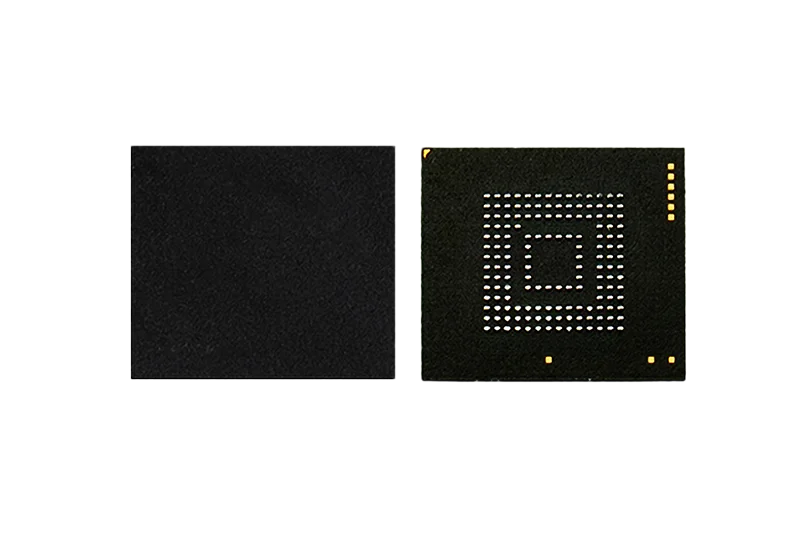
Industrial eMMC 5.1 combines NAND flash with a controller that handles ECC, wear leveling, and bad block management, simplifying system design. This guide walks through the key steps for integrating Loongtion's industrial eMMC (YMDL and YIDL series) into embedded systems, with emphasis on boot storage, HS400 mode, partitioning, and endurance optimization.
Hardware Integration: Pinout, Power, and Layout
Pin Signal Description
The eMMC interface uses a 12-line bus: CLK, CMD, Data Strobe (DS), 8-bit data bus (DAT[7:0]), and RST_n. Power is supplied via VCC (NAND core, 2.7–3.6 V) and VCCQ (I/O interface, 1.7–1.95 V for high-speed or 2.7–3.6 V for legacy mode).
| Pin / Signal | Direction | Description |
|---|---|---|
| CLK (M6) | Input | Clock for sampling commands and data |
| CMD (M5) | I/O | Command/response, open-drain during init, push-pull after |
| DAT0–DAT7 (A3–B6) | I/O | 8-bit bidirectional data bus |
| DS (H5) | Output | Data strobe for HS400 mode |
| RST_n (K5) | Input | Hardware reset (disabled by default) |
| VCC (E6, F5, J10, K9) | Power | NAND core: 2.7–3.6 V |
| VCCQ (C6, M4, N4, P3, P5) | Power | Interface: 1.7–1.95 V (high-speed) or 2.7–3.6 V |
| VDDi (C2) | Output | Controller core, connect 0.1–2.2 µF cap to ground |
Power-Up Sequence
Ensure VCC and VCCQ ramp within the specified timing (VCC: 5 µs to 35 ms, VCCQ: 5 µs to 25 ms). After power stabilizes, the host provides at least 74 clock cycles before sending commands. For detailed timing, refer to the datasheet's power-on diagram (Figure 4).
PCB Layout Tips
- Keep signal traces (CLK, CMD, DAT) length-matched, especially for HS400 operation.
- Place decoupling capacitors (0.1 µF and 10 µF) close to VCC and VCCQ pins.
- The VDDi pin requires a 0.1–2.2 µF capacitor to ground for the internal LDO.
Initialization and HS400 Mode Setup
Initialization Sequence
- Power up and wait for stable clock (≤400 kHz).
- Send CMD0 (GOIDLESTATE) to reset the device.
- Send CMD1 (SENDOPCOND) with OCR voltage window; loop until device ready.
- Send CMD2 (ALLSENDCID) to get the unique card ID.
- Send CMD3 (SETRELATIVEADDR) to assign a relative address (RCA).
- Send CMD9 (SEND_CSD) to read card-specific data.
- Select card with CMD7 using the RCA.
- Read EXT_CSD (CMD8) to check supported features and mode.
Switching to HS400 Mode
HS400 mode requires 1.8 V signaling on VCCQ and an 8-bit bus width. Use CMD6 (SWITCH) to set the timing interface:
- Verify that EXTCSD[185] (DEVICETYPE) indicates HS400 support.
- Set PARTITIONCONFIG (EXTCSD[179]) if needed for boot.
- Switch to high-speed mode (CMD6, arg: access=3, index=1, value=0x1 for HS52MHz).
- Increase clock to 52 MHz.
- Switch to HS200 (CMD6, index=1, value=0x2) and adjust host timing.
- Finally switch to HS400 (CMD6, index=1, value=0x3) and enable DS signal.
The DS pin becomes active only after HS400 is configured. The clock can then be raised to 200 MHz for maximum throughput.
Partition Management for Boot Storage
eMMC devices include boot partitions, a user area, and an RPMB partition. For booting an embedded OS, the boot partitions are critical.
Setting Up Boot Partitions
- Use EXTCSD[179] (PARTITIONCONFIG) to select the active boot partition.
- Set EXTCSD[192] (BOOTPARTITION_ENABLE) to enable boot access.
- Write the bootloader image to the boot partition using the appropriate write commands.
Loongtion eMMC supports enhanced attribute partitions, which can be used for critical data requiring extra reliability.
RPMB for Secure Storage
The Replay Protected Memory Block (RPMB) provides authenticated access for storing security keys or firmware metadata. The host must use a shared secret key to write or read RPMB blocks.
Endurance and Reliability Considerations
Wear Leveling and ECC
The built-in controller performs dynamic and static wear leveling, along with LDPC-based ECC, to extend device life. For applications with heavy write loads, consider using pSLC mode (available on YMDL series) which offers higher endurance at the cost of capacity.
Product Comparison (Loongtion eMMC):
| Capacity | Part Number | Flash Type | Temperature Range | Package |
|---|---|---|---|---|
| 8 GB | YMDL008MNS-S | pSLC | -55 °C to 105 °C | 153 FBGA |
| 16 GB | YMDL016MNS-S | pSLC | -55 °C to 105 °C | 153 FBGA |
| 32 GB | YMDL032MNS-S | pSLC | -55 °C to 105 °C | 153 FBGA |
| 64 GB | YMDL064MNS-S | pSLC | -55 °C to 105 °C | 153 FBGA |
| 32 GB | YIDL032MNT-S | TLC | -40 °C to 85 °C | 153 FBGA |
| 64 GB | YIDL064MNT-S | TLC | -40 °C to 85 °C | 153 FBGA |
| 128 GB | YIDL128MNT-S | TLC | -40 °C to 85 °C | 153 FBGA |
| 256 GB | YIDL256MNT-S | TLC | -40 °C to 85 °C | 153 FBGA |
Power Consumption
Power figures vary by mode. For example, in HS400 mode the YMDL032MNS-S reads 60 mA (ICC) and writes 45 mA (ICC). The wider temperature range models (YMDL) consume slightly more due to extended temperature support.
Data Protection Features
- Reliable Write: Guarantees that old data remains unchanged until new data is safely programmed, ensuring atomic updates.
- Secure Erase and Trim: Secure erase physically overwrites erase groups; Trim marks logical blocks as invalid for garbage collection.
- Power-Fail Protection: The controller ensures that in-progress writes do not corrupt existing data.
Selection Guide: pSLC vs TLC
| Aspect | pSLC (YMDL Series) | TLC (YIDL Series) |
|---|---|---|
| Endurance | ~10x higher than TLC | Standard TLC endurance |
| Temperature Range | -55 °C to 105 °C | -40 °C to 85 °C |
| Typical Use | Industrial, automotive, high-reliability boot | Consumer/industrial mass storage |
| Cost per GB | Higher | Lower |
For boot partitions, pSLC is recommended because it withstands frequent updates and extended temperature swings.
Internal Links
- Explore the full line of Industrial Memory Chips for system design.
- Browse Storage Chips for additional eMMC and NAND options.
- See the detailed Industrial eMMC TLC product page for specifications.
- Read the companion whitepaper Industrial eMMC 5.1 Storage Guide for deeper protocol details.
Conclusion
Integrating industrial eMMC 5.1 requires careful attention to power sequencing, signal integrity for HS400, and correct partition configuration. Loongtion's eMMC devices offer both pSLC and TLC options to match endurance and temperature requirements. By following the initialization steps and leveraging the built-in reliability features, designers can achieve robust boot storage for embedded systems.
For related products and specifications, see the product line.
Related products
Shortlist lines referenced in this guide — open the product page for PN, grades, and datasheet request.
Related resources
Continue with related selection guides and notes for the same industrial memory topic.
Related cross-references
Pin-to-pin and functional alternatives referenced from this guide — for BOM review, dual-sourcing, or EOL coverage.